









Welcome to IndustryBuying Help Center!
Help Topics
Accepted Payment Methods
On Industrybuying, the following payment options are typically accepted:
1. Credit/Debit Cards
- Industrybuying accepts major credit and debit cards such as Visa, MasterCard, American Express, and Rupay for secure online payments.
2. Net Banking
- Customers can make payments directly from their bank account using Net Banking
Frequently Asked Questions
Industrybuying accepts a variety of payment methods, including:
- Credit/Debit Cards (Visa, MasterCard, American Express, Rupay)
- Net Banking (from various banks)
- UPI (Unified Payments Interface) via apps like Google Pay, PhonePe, etc.
- Digital Wallets such as Paytm, Amazon Pay, and Google Pay
- Cash on Delivery (COD) (available for selected products and locations)
- Bank Transfers for bulk or corporate orders
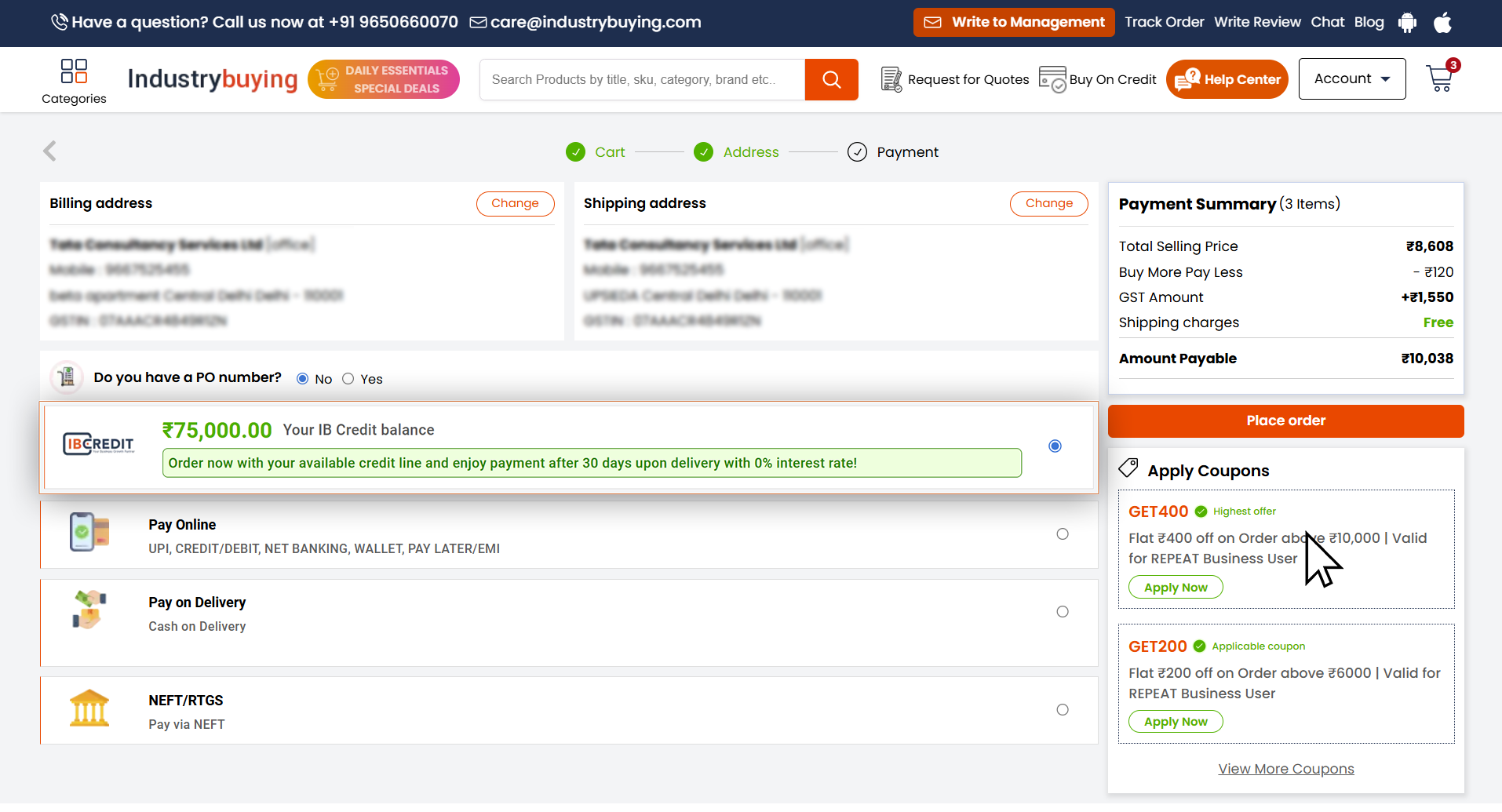
- Buy Now, Pay Later (IB Credit) for B2B customers registered using GST (up to 5 lakh credit, repayment within 30 days, 0% interest)
- EMI (Equated Monthly Installments) options for credit card payments
- Gift Cards/Vouchers (redeemable during checkout)
Step 1: Add Products to Cart
Browse the platform and add your desired products to the cart.
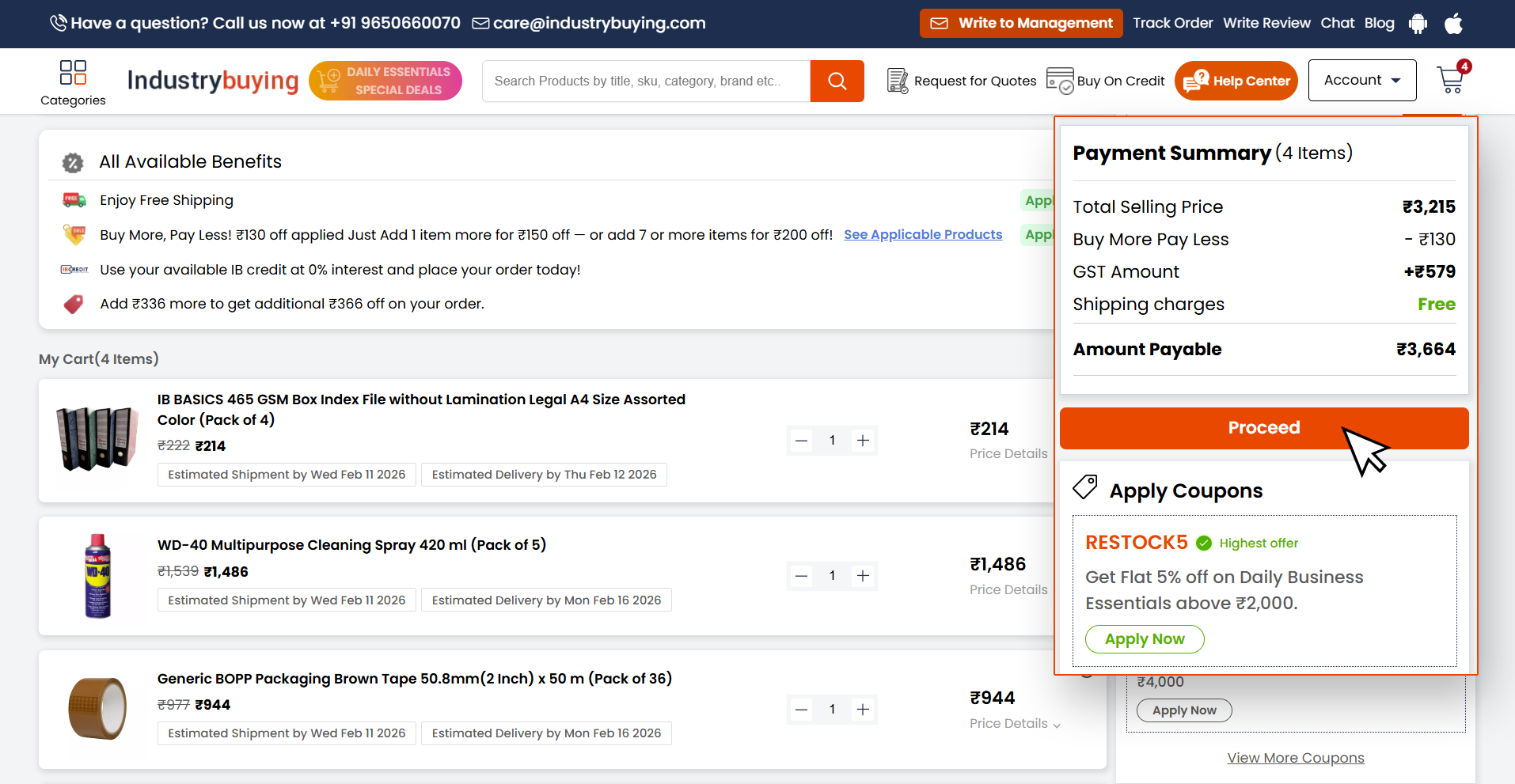
Step 2: Proceed to Checkout
Open your cart and click on Proceed to start the checkout process.
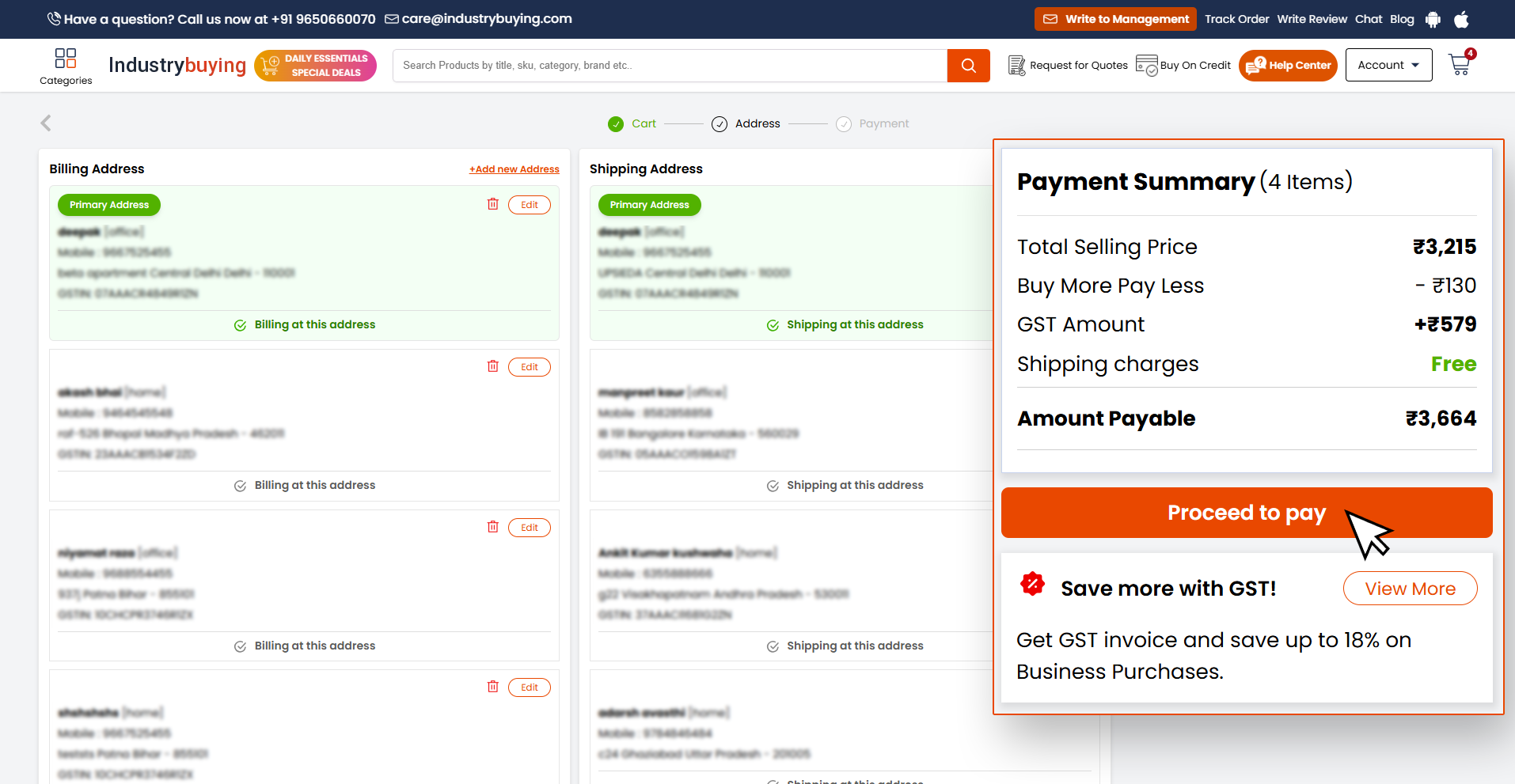
 Step 3: Select Billing Address
Choose or add your billing address, then click Proceed to Pay.
Step 4: Choose Payment Method
On the payment page, select Pay Online as your payment option.
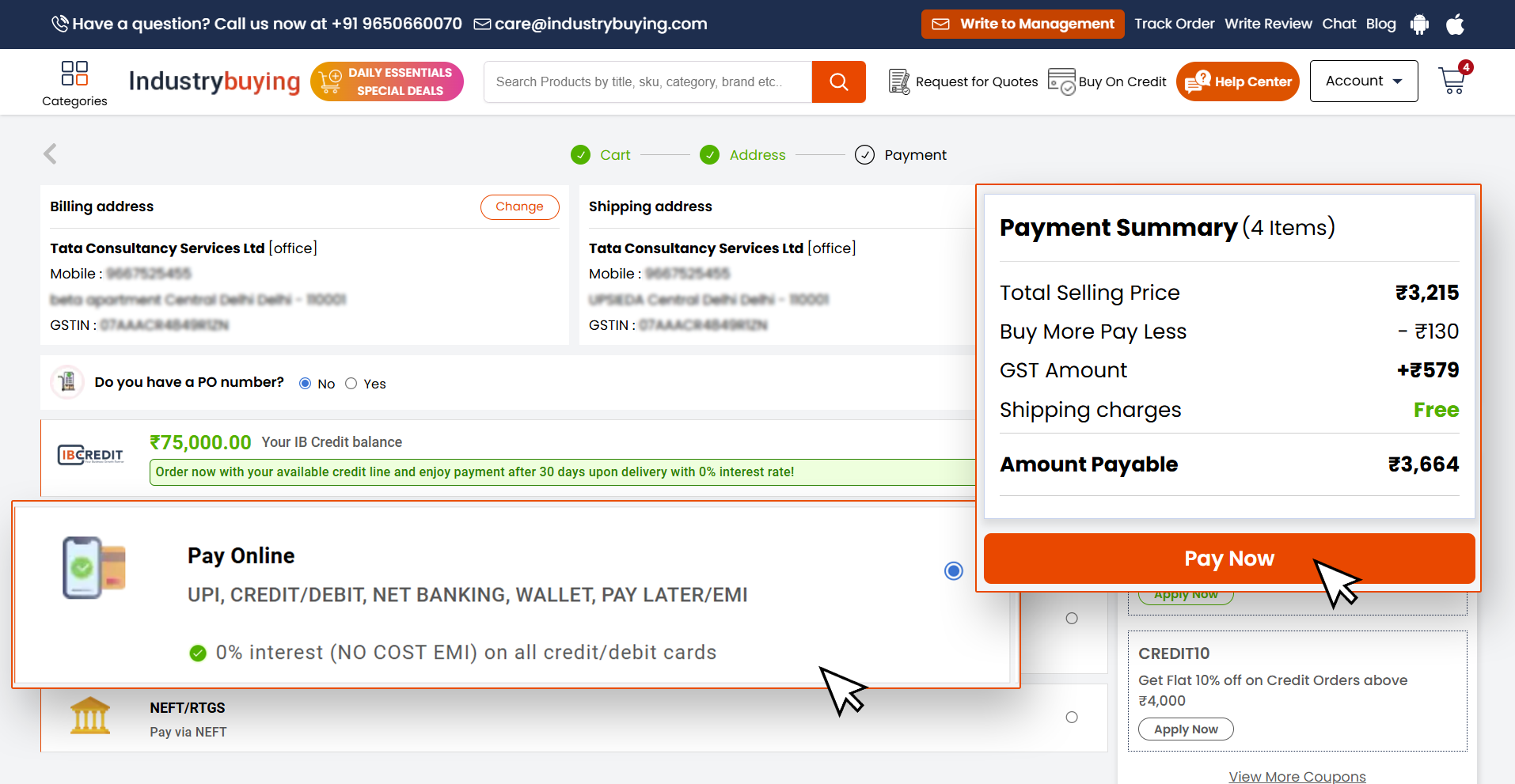
Step 5: Select EMI Option
Click on Pay Now. You will see the No-Cost EMI option available.
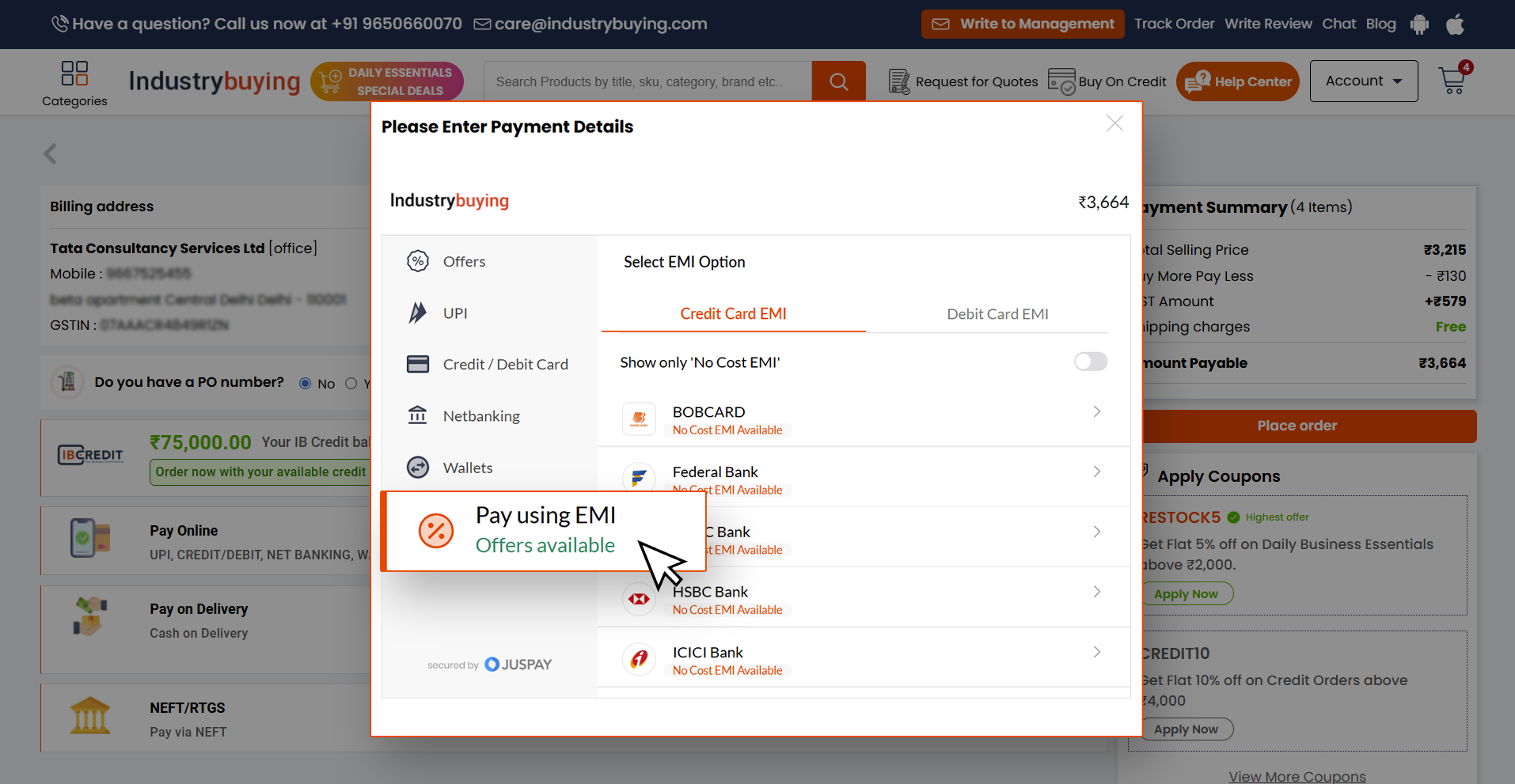
Step 6: Choose Bank & Card
Select your preferred bank and enter your credit or debit card details.
Step 7: Complete the Payment
Confirm the EMI plan and complete the payment to place your order successfully.
Once an order is placed and payment is initiated, it is generally not possible to change the payment method. However, if the payment hasn’t been processed yet, you may contact our customer support team to modify your payment method before the order is confirmed.
You can reach us at +91 9650660070 or email us at care@industrybuying.com.
To apply a promo code or discount:
- During checkout, look for the “Apply Promo Code” or “Discount Code” section.
- Enter the code and click Apply. The discount will be reflected in your total order amount before proceeding with the payment.
Please ensure the promo code is valid, and meets the terms and conditions (e.g., minimum order value, product exclusions).
Payments are generally processed immediately during checkout. However, it may take up to 24–48 hours for certain payment methods such as bank transfers or EMI payments.
If you encounter any delays, please contact our customer support team at +91 9650660070 or email us at care@industrybuying.com.
Yes, you can opt for EMI (Equated Monthly Installments) or Buy Now, Pay Later (IB Credit) if eligible. EMI is available via credit cards and can be selected during checkout. With IB Credit, you can buy and pay within 30 days, subject to eligibility.
IB Credit
What is IB Credit?
IB Credit is a "Buy Now, Pay Later" payment facility offered by IndustryBuying for eligible business customers. It allows you to place orders and make the payment within 30 days from the delivery date, helping you manage cash flow while continuing your purchases.
Who is eligible for IB Credit?
IB Credit
Frequently Asked Questions
To apply for IB Credit, follow these simple steps:
1. Log in or create an account on the IndustryBuying platform.
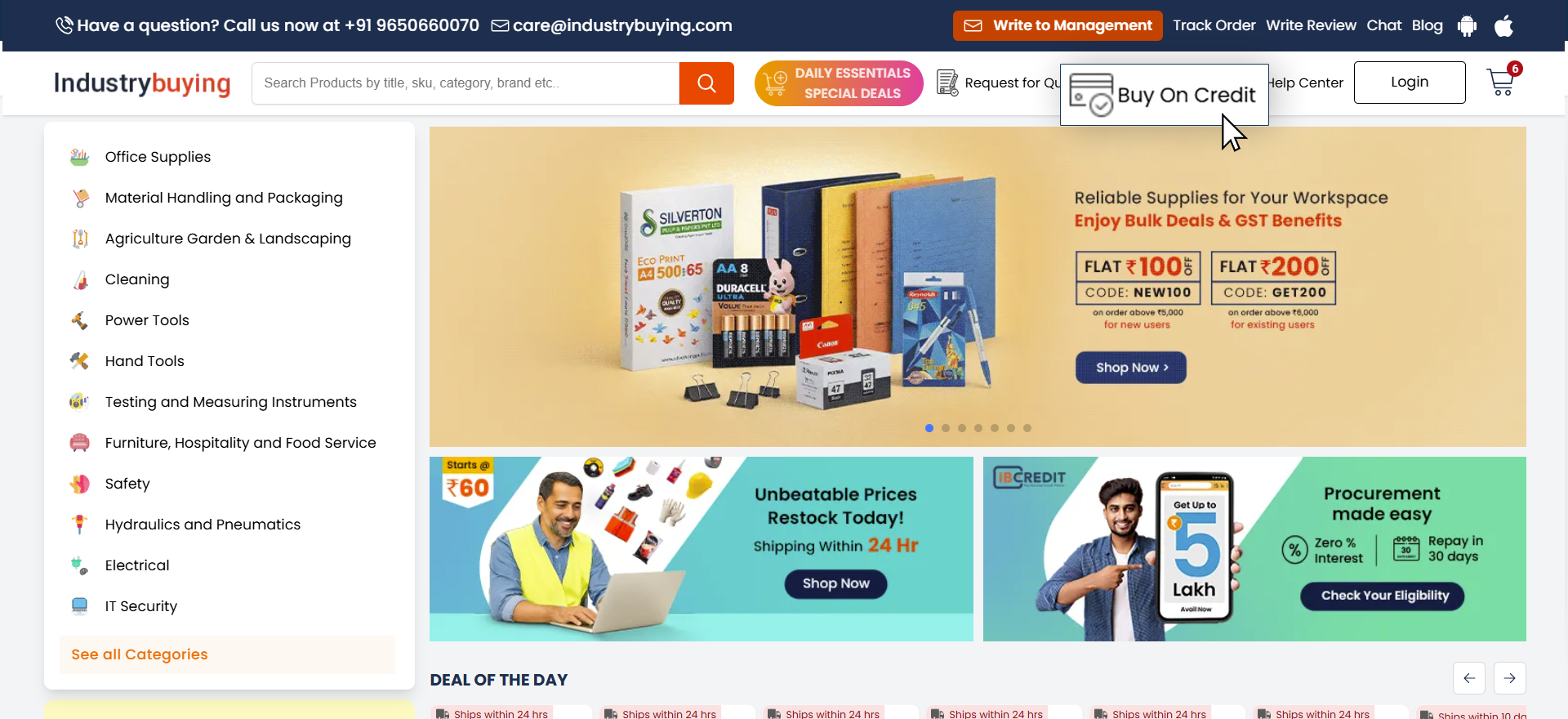
2. On the top of the homepage, click on “Buy on Credit.”
3. Fill in the required details such as:
– Finance Person Name
– Finance Person Contact Number
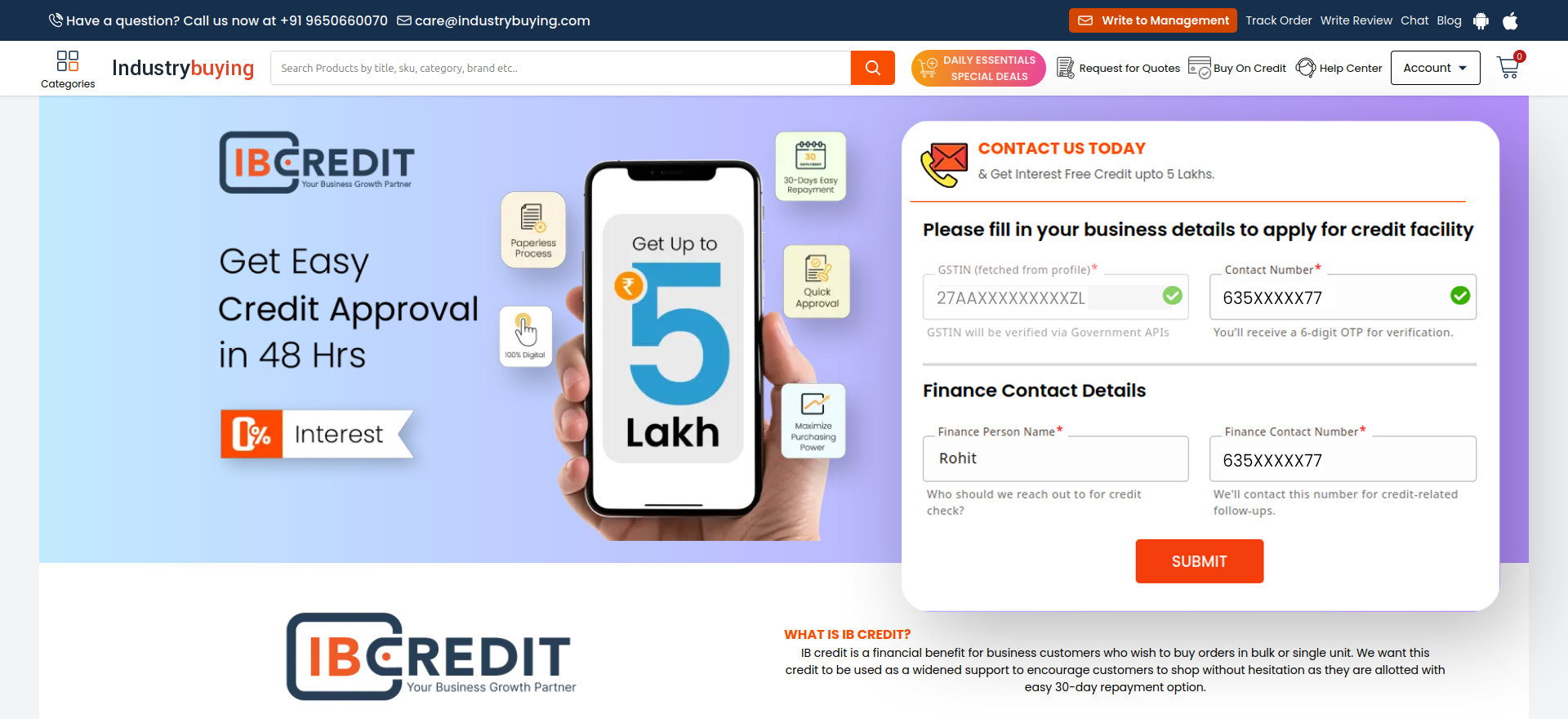
4. Click on the Submit button.
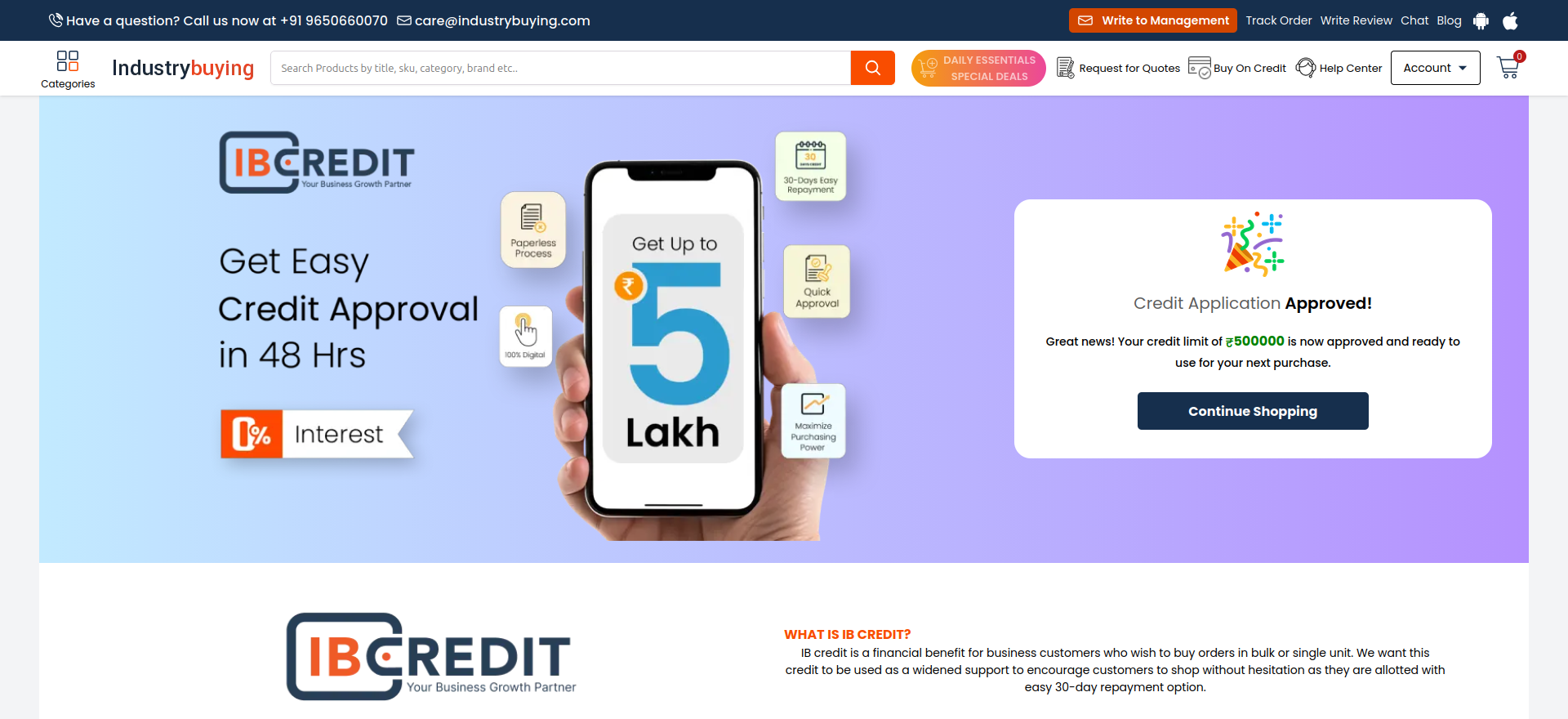
– Once submitted, IB Credit will be allocated in real time, subject to successful verification.
To use IB Credit:
- Ensure you are an approved IB Credit customer.
- Add items to your cart and proceed to checkout.
- Select "IB Credit" as the payment method.
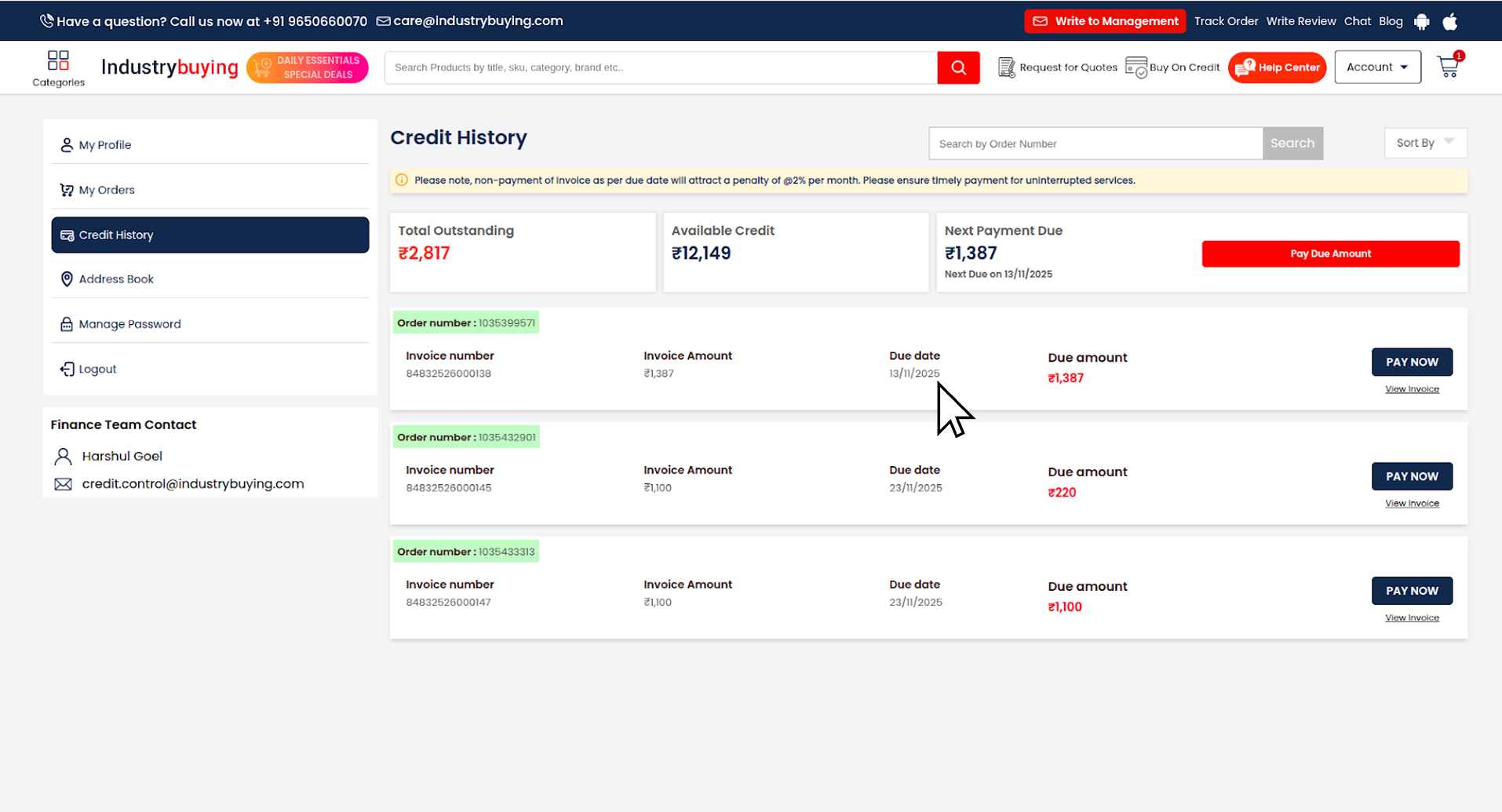
- Once the order is delivered, you’ll receive an invoice with a 30-day payment window.
You can repay your IB Credit dues using the following methods:
- Online Payment: Use the payment link shared with your invoice or log in to your account to pay online.
- Bank Transfer/NEFT/RTGS: Details are available in your invoice or from our finance team.
All B2B customers are eligible for the IB Credit feature. To avail this benefit, you must have a valid GST number registered with your business account.
To check your available IB Credit balance:
- Log in to your IndustryBuying account and go to the ‘IB Credit’ or ‘My Credit’ section.
- You can also contact your account manager or customer support for assistance.
This could happen due to:
- Your account is not approved for IB Credit.
- Your credit limit is already used or insufficient for the order value.
Solution:
- You can reach our customer support team at +91 9650660070 or email us at care@industrybuying.com.
- Ensure your order value is within the remaining credit balance.
IB Credit limits are reviewed and updated on a weekly basis based on your past order history and internal credit assessment.
To apply for IB Credit during registration, please follow these steps:
- Visit www.industrybuying.com.
- Click on Login at the top right corner of the homepage.
- Select Create an Account.
- Enter your business details along with a valid GST number.
- Verify your registered mobile number using the OTP sent to you.
Once your details are successfully verified, your IB Credit limit will be allocated based on your GST information and eligibility. You can then start enjoying the benefits of IB Credit on your purchases.
Payment Issues
Payment Issues
Here are some common payment issues that customers may encounter on Industrybuying, along with troubleshooting tips:
1. Payment Declined by Bank
Possible Causes:
- Insufficient funds in the account or card.
- Incorrect card details (e.g., wrong CVV, expiry date).
- The bank has blocked the pay
Frequently Asked Questions
Your payment could have been declined for various reasons:
- Insufficient funds in your account or card.
- Incorrect card details (CVV, expiration date, etc.).
- Your bank may have blocked the transaction due to security reasons.
- The payment gateway may be facing technical issues.
Please verify your payment details, ensure you have sufficient funds, and check with your bank if necessary. If the issue persists, contact customer support for assistance.
UPI payments may fail due to:
- Incorrect UPI ID or details entered.
- Poor internet connection or network issues.
- The UPI payment app may be experiencing downtime or issues.
- Insufficient balance in the linked bank account.
Check your UPI details, ensure you have a stable internet connection, and try again. If the issue persists, contact customer support for further help.
If your payment has been successfully processed but isn’t showing in your order history:
- Wait for a few minutes, as it may take some time to update.
- Verify the payment status with your bank or payment method (check your account balance or transaction history).
Contact customer support with the payment reference details if there’s still an issue.
Cash on Delivery (COD) may not be available for certain products or locations due to:
- High-value items or bulk orders.
- Ineligible delivery addresses or regions.
- COD availability may vary based on the order’s size or payment security.
If COD is unavailable, consider using another payment method like credit/debit cards, UPI, or digital wallets.
If you’ve been charged but haven’t received your order:
- Check your order status in your account to verify if the order is still being processed.
- Check your email for any shipping or delivery updates.
- Contact customer support immediately with your order details for assistance.
If your payment status is marked as Pending:
- Check your internet connection and refresh the page.
- If you used a bank transfer or UPI, verify that the payment has been successfully processed from your side.
- Contact customer support with your payment details and order ID for further assistance.
- Refunds are processed based on the payment method used (credit card, bank transfer, etc.).
- You can check the Refund Status in your Order History.
- If you haven’t received a refund within the expected time, contact customer support with the relevant details.