









Welcome to IndustryBuying Help Center!
How Can I Cancel My Order?
5 people found this helpful
Last Updated on February 3, 2026
Log in to Your Account:
- Go to the Industrybuying website or open the mobile app.
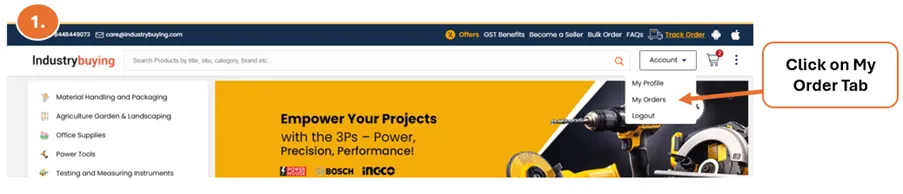
- Navigate to "My Orders".
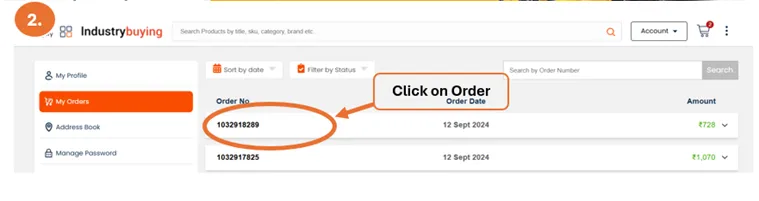
Select the Order:
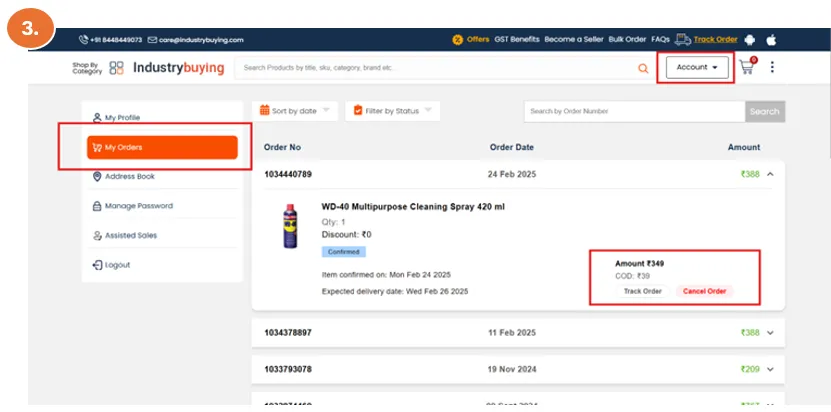
- Find the order you wish to cancel and click on "Cancel Order".
- If the order has not been shipped yet, you will see an option to cancel the order.
Cancellation Confirmation:
- After submitting your cancellation request, you will receive an email confirming the cancellation if it is processed successfully.
Frequently Asked Questions
Was this information helpful?