










Welcome to IndustryBuying Help Center!
Help Topics
Tax Invoices & WarrantyWhat is a Tax Invoice?How Can I Get the Tax Invoice of My Order/ Download Invoice?Can I Claim GST back on My Order?What GST Rate is Applied to My Order?How Long Is the Warranty Period of My Product?What Does the Warranty Cover?How Can I Claim My Warranty?Does the Warranty Cover Accidental Damage?Where Can I Find My Warranty Details?Can I Extend My Product’s Warranty?
How Can I Get the Tax Invoice of My Order/ Download Invoice?
2 people found this helpful
Last Updated on February 3, 2026
To get the tax invoice for your order on Industrybuying, follow these steps:
1.Log In to Your Account:
- Visit the Industrybuying website or app and log in with your account credentials.
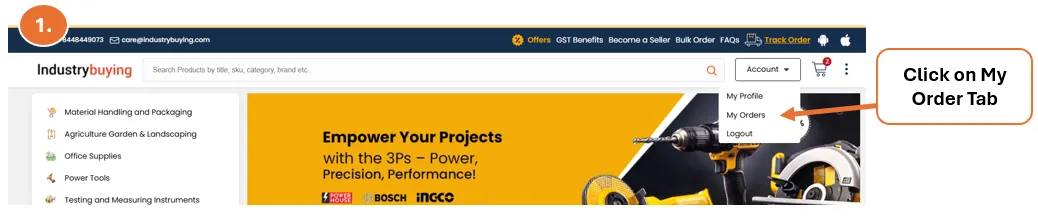
2.Go to "My Orders":
- After logging in, navigate to the "My Orders" section where you can view all your past and current orders.
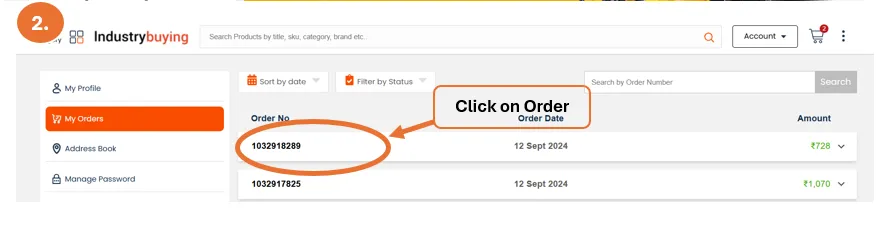
3.Select the Order:
- Find and select the order for which you need the tax invoice.
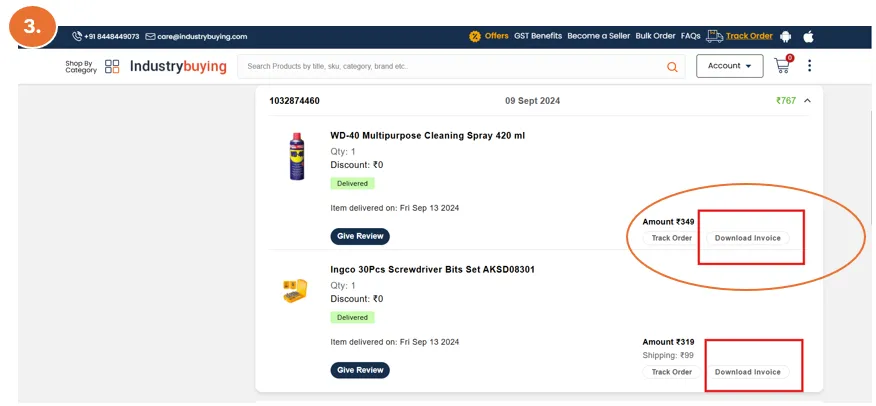
4.Download the Invoice:
- Click on the "View Invoice" or "Download Invoice" option (usually located beside the order details).
- The GST-compliant tax invoice will be available for download in PDF format.
5.Check the Invoice Details:
- Make sure the invoice includes all necessary details such as the GSTIN, product details, price, GST breakdown, and total amount.
If you are unable to find the tax invoice for your order or face any issues, you can contact Industrybuying's customer support via:
- Email: care@Industrybuying.com
- Phone: +91 9650660070
Our support team will assist you in obtaining the invoice.
Was this information helpful?