










Welcome to IndustryBuying Help Center!
Help Topics
Tax Invoices & WarrantyWhat is a Tax Invoice?How Can I Get the Tax Invoice of My Order/ Download Invoice?Can I Claim GST back on My Order?What GST Rate is Applied to My Order?How Long Is the Warranty Period of My Product?What Does the Warranty Cover?How Can I Claim My Warranty?Does the Warranty Cover Accidental Damage?Where Can I Find My Warranty Details?Can I Extend My Product’s Warranty?
What GST Rate is Applied to My Order?
Last Updated on October 6, 2025
Steps to Check the GST Rate Applied on Your Order:
1. Log In to Your Account:
- Visit the Industrybuying website or app and log in using your credentials.
2. Go to "My Orders":
- Navigate to the "My Orders" section where you can view all your previous and current orders.
3. Select the Order:
- Click on the order for which you want to check the GST rate.
4. View the Invoice:
- Click on "View Invoice" or "Download Invoice". The invoice will include details of the products and the applicable GST rate (CGST, SGST, or IGST).
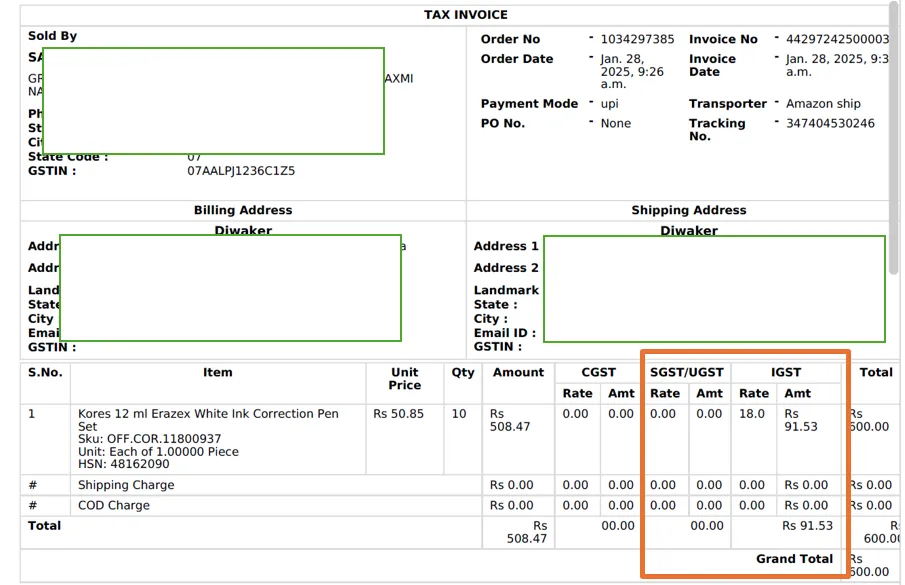
GST Rates on Industrybuying Products:
- GST Rates vary depending on the type of product. Common GST rates for industrial products include:
- 5% for essential goods like certain raw materials or tools.
- 12%, 18%, 28% for other items, depending on their category.
Was this information helpful?